

Using the Li-View
Thank you for purchasing the most advanced Forward-Facing Sonar (FFS) pole on the market!
Initial Setup
1. Charging
• Before first use, fully charge your Li-View.
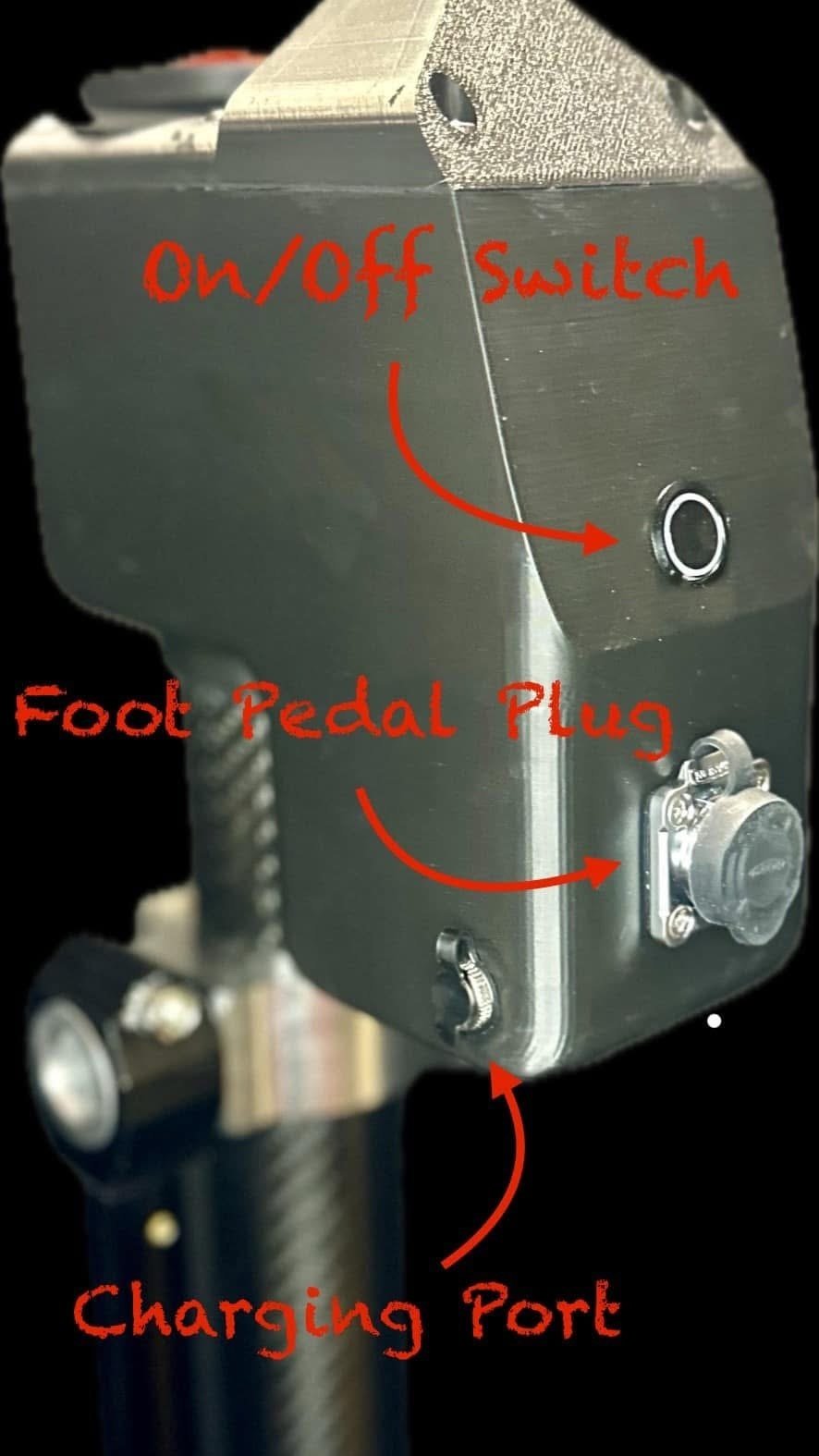
• Insert the male charging port from the included 110V 1000mAh charger into the female charging port on the side of the Li-View head.
• The light on the charging cord will turn red, indicating charging.
• When the light turns green, your Li-View is fully charged and ready for use.
2. Attaching Your Transducer
• Set the arrow to center and position your transducer as low as possible on the Li-View pole.
• Secure your transducer cable using electrical tape to protect both the cable and your Li-View pole.
Deployment Instructions
1. Unfolding the Li-View Pole
• From the stowed position, fold the Li-View shaft outward until you are able to lock the hinged union in place.
• Use the provided 6mm wrench to open the pivoting 7/8” shaft, then lock it at 90° so the back of the head is positioned over the top.
2. Mounting Options
For Track Systems:
• Slide the track mount into your track system and tighten it with the provided thumbscrew.
• Open the hinged pipe clamp, insert the shaft, drive the pin through the shaft and into the track mount, then flip the hinge over and tighten the mount with the thumbscrew.
• The pin prevents rotation, and the pipe clamp secures the pole to prevent it from falling off.
For Rail Mounts:
• Using an Allen wrench, attach the universal mount to your boat’s rail, ensuring the flat part faces outward.
• Open the hinged pipe clamp, insert the shaft, drive the pin through the shaft and into the rail mount, then flip the hinge over and tighten the thumbscrew.
• The pin prevents rotation, and the pipe clamp secures the pole to prevent it from falling off.
Operation
1. Powering On
• Press the center power button until the blue light illuminates. This indicates that your Li-View is powered on and ready for use.
2. Using the Foot Pedal
• Lift the rubber water seal and insert the three-pin plug into the corresponding port.
• Press the left pedal to turn the sonar left.
• Press the right pedal to turn the sonar right.
• To disconnect the pedal, press the silver thumb button and pull the plug out.
3. Using the Remote Control
• Press the “A” button to turn left.
• Press the “B” button to turn right.
Stowing & Transport
• Before moving your boat, remove the mounting shaft from the mounting hardware and flip it inside the boat.
• DO NOT leave your Li-View hanging off the side of your boat while on plane.
Weather & Water Resistance
• The Li-View is highly water-resistant, but not waterproof.
• Avoid submerging the unit or exposing it to rain for extended periods.
Your Li-View is now ready to fish! Enjoy the best sonar control experience on the market!